📲 Join the GridScalper community for releases, set files & tips  →  t.me/Gridscalper
MT5 Expert Advisor  ·  XAUUSD Gold  ·  v2.45.0

Pass Prop Firm Challenges
with GridScalper

A professional grid EA for XAUUSD — smart ranging detection, virtual balance protection, and built-in prop firm rules so you pass and keep your funding.

⬇ Download EA Join Telegram
5xMargin safety buffer
M1Optimised timeframe
XAUUSDPrimary instrument
v2.45Latest version
Features
Everything you need to pass and profit

GridScalper combines precise ranging detection with multiple safety layers built to meet strict prop firm rules.

Virtual Balance

Optimise against a small virtual account while your real balance provides bulletproof margin protection. 5x safety headroom built in.

📊

Ranging Mode Detection

ADX + RSI confluence ensures entries only fire when the market is truly sideways — avoiding the trends that destroy grid strategies.

🛡

Prop Firm Daily Loss Guard

Automatic halt when the daily loss limit is reached. Supports FTMO (5%), MyForexFunds (4%) and any custom percentage.

📰

News Filter

Built-in USD high-impact event calendar. Blocks entries and closes positions before NFP, FOMC and other major events.

🔄

Profit Cycle Lot Sizing

Automatically steps up lot size as closed profit grows — compound your edge on live funded accounts without manual intervention.

Smart Time & Day Filters

Trade only your best sessions. Configurable windows, day-of-week, month filters, and automatic skip of month-end volatility.

Live Results
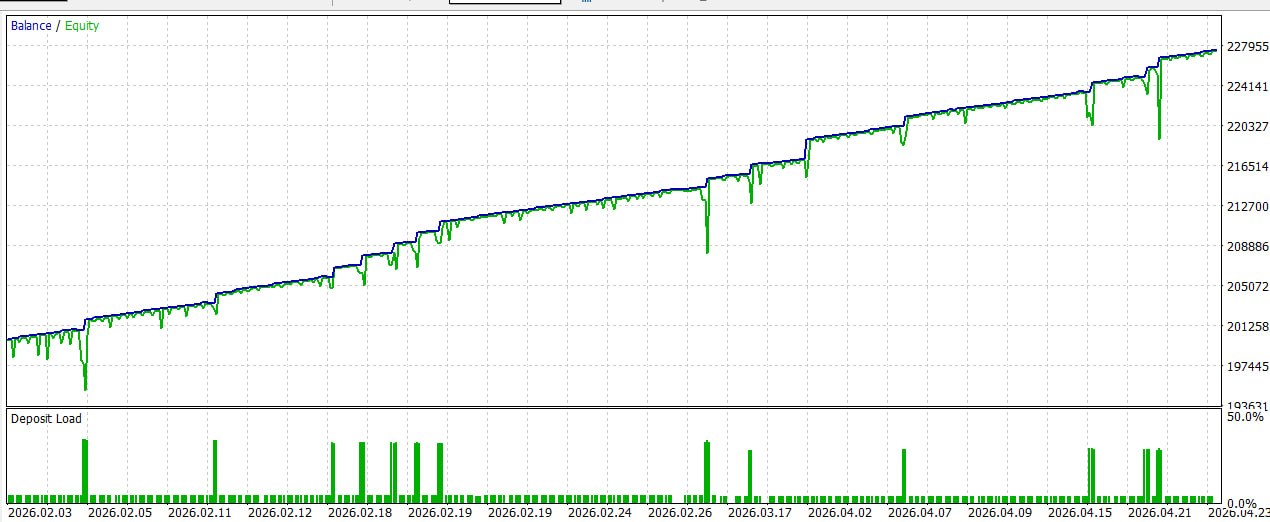
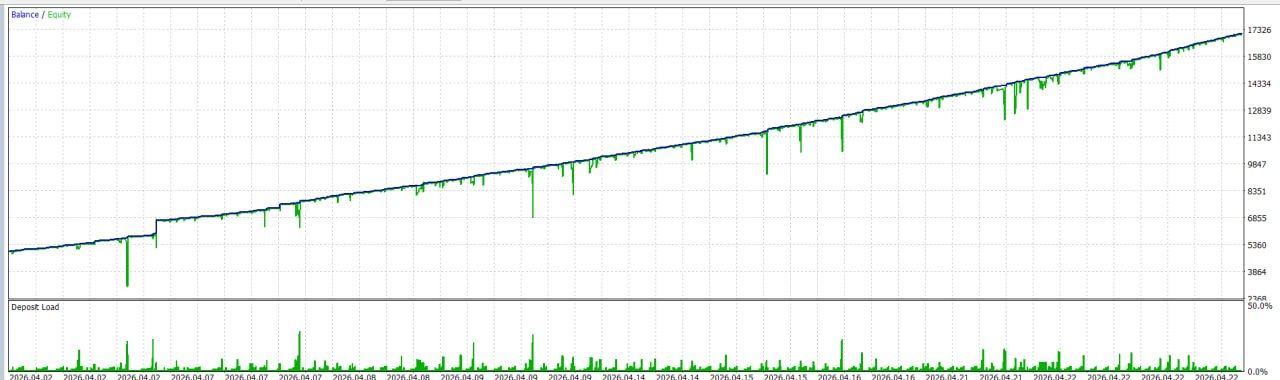
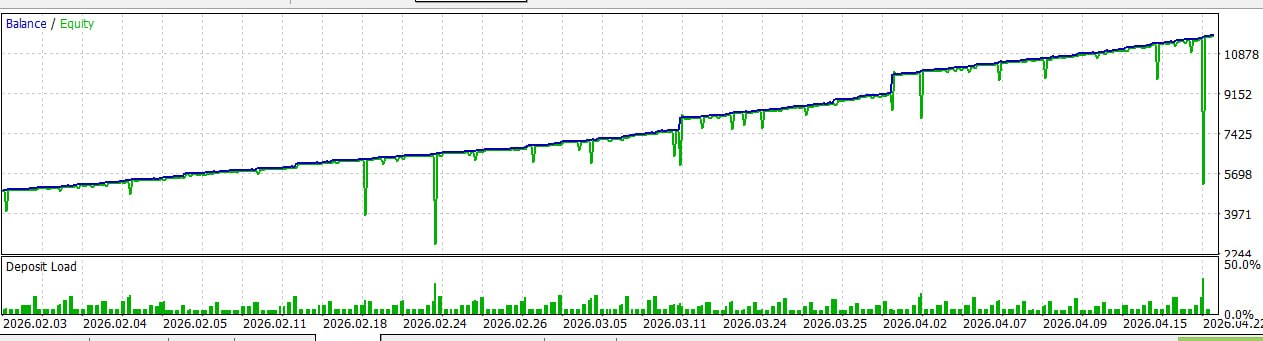
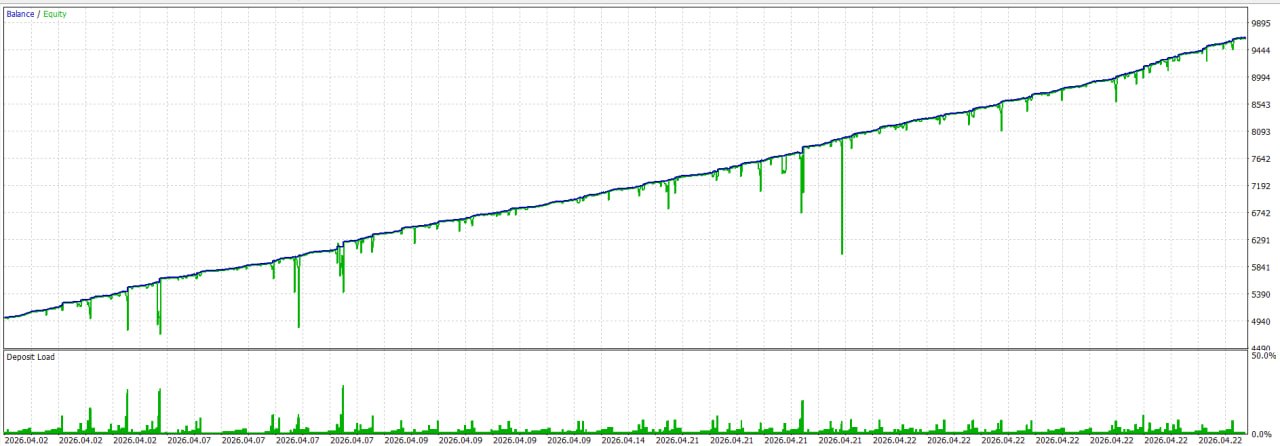
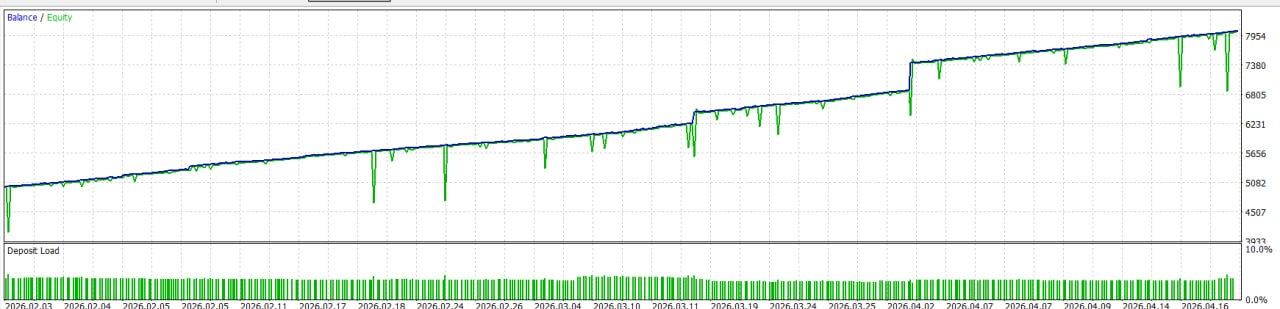
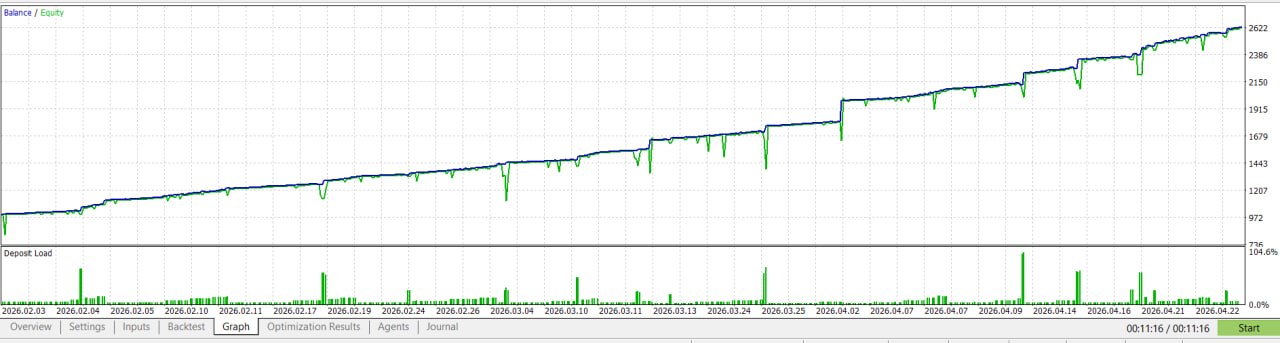
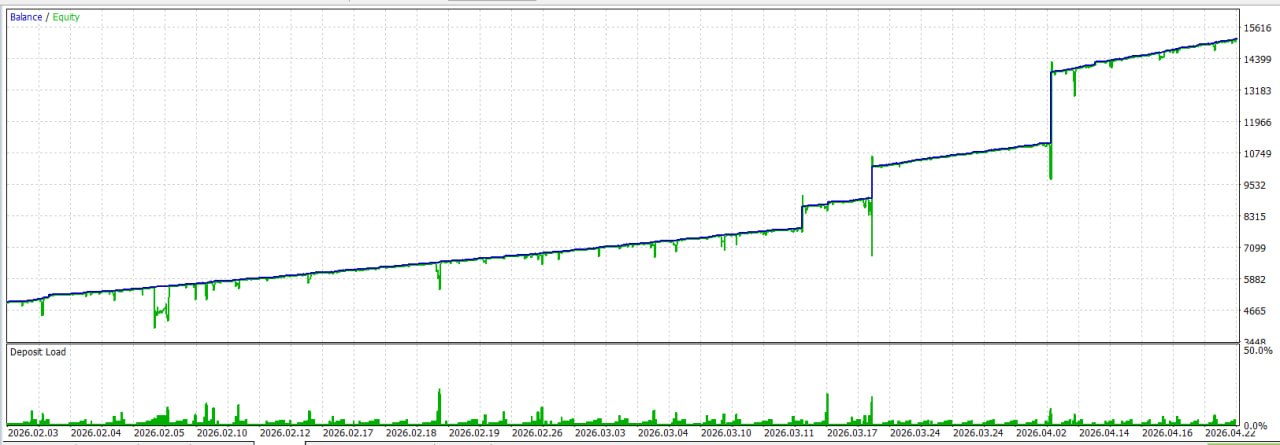
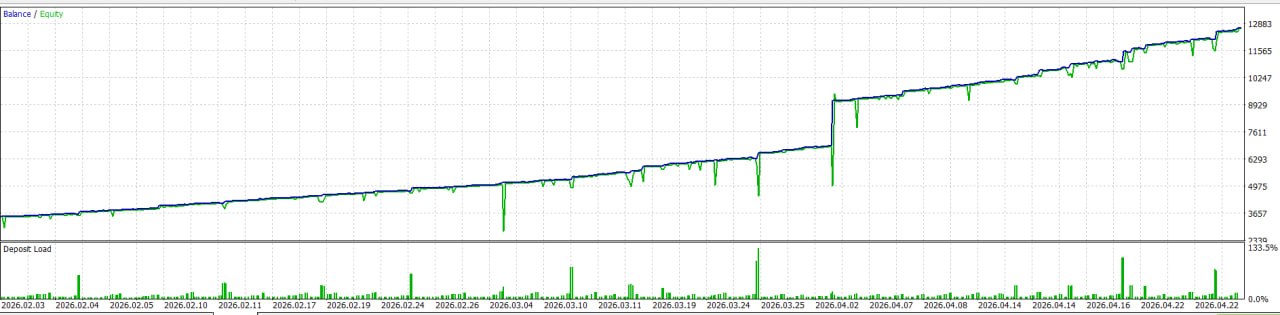
Real backtest results from the channel

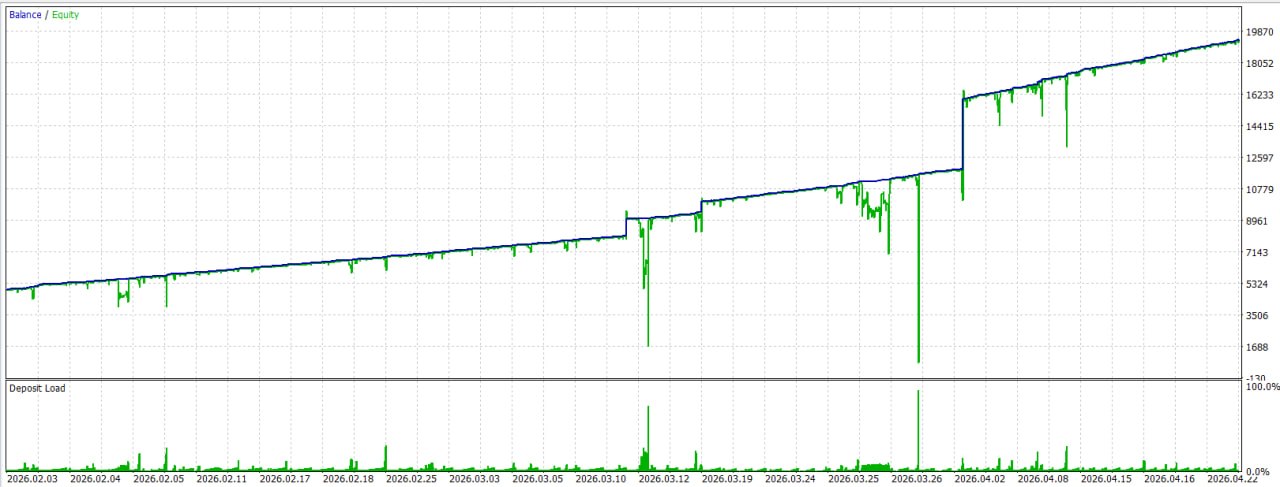
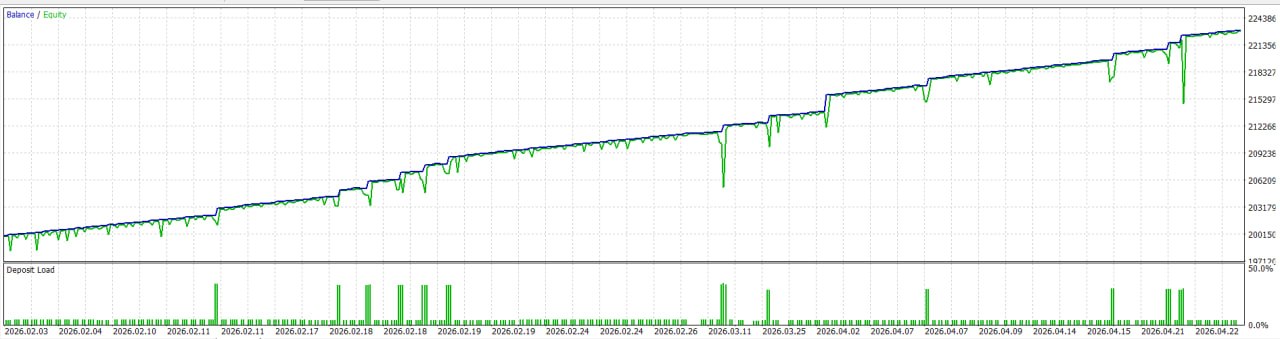
Every result posted by the community — unfiltered, directly from the Telegram channel.
Virtual Balance
Optimise small. Trade safe.

Set a virtual balance lower than your real account — the EA sizes lots against the virtual figure while your real funds absorb any drawdown.

Prop Firm Challenge

Real account$100,000
Virtual balance$20,000
Lot size (base)0.01 per $1,000
Safety buffer$80,000
Margin headroom5x

Why it works

Backtest optimised on$20,000 virtual
Live lot sizes matchbacktest exactly
Margin call requires80% loss
Daily DD limitAuto-halts at 5%
ResultClean pass
Set File Profiles
Ready-made configurations

Load the right set file for your situation — every key setting pre-configured and tested.

Prop Firm / FTMO v2.44

VirtualBalance20000 (on)
MinSpacingPips180
BEOffsetPips140
NewsFiltertrue · 2h/6h
PropDailyLosstrue @ 5%
CycleEnabledfalse
Trade DaysTue - Thu

Live Funded Account v2.45

VirtualBalancedisabled
MinSpacingPips130
BEOffsetPips56
NewsFilterfalse
PropDailyLossfalse
CycleEnabledtrue · $25 / 4 tiers
Trade DaysTue - Thu
Settings Reference
Full parameter guide

Every setting explained — default values and recommended FTMO config side by side.

Lot Sizing
ParameterDefaultFTMODescription
LotAutoModetruetrueAuto-scale lots with balance — recommended on
LotSizeBase0.010.01Starting lot at the first balance step
LotSizeStep0.040.04Lot added per extra balance step
LotBalanceStep10001000$ per lot step — 0.01 per $1,000
Virtual Account Size
ParameterDefaultFTMODescription
VirtualBalanceEnabledfalsetrueKey prop firm setting. EA sizes lots against VirtualBalance, not your real balance
VirtualBalance2000020000Simulated balance for lot sizing — match your optimisation value
Grid Trading
ParameterDefaultFTMODescription
GridMaxPositions22Max open positions per direction — keep low on prop challenges
GridLotMultiplier7.47.4Lot multiplier for 2nd+ grid position (0.01 to 0.074)
GridADXThreshold20.020.0Min ADX to allow entry — below this = ranging market
GridRefreshSecs3030Seconds between grid logic rechecks
MinSpacingPips130180Min pips between open positions — higher = safer on prop
Ranging Mode
ParameterDefaultFTMODescription
RangingModeEnabledtruetrueCore entry filter — only trades when ADX confirms sideways market
RangingADXMax2626ADX must be below this to allow any entry
RangingRSIBuy3232RSI must be at or below this to enter long
RangingRSISell6161RSI must be at or above this to enter short
News Filter
ParameterDefaultFTMODescription
NewsFilterEnabledfalsetrueEnable on all prop challenges. Blocks entries around high-impact events
NewsClosePositionsfalsetrueClose open trades when a news window starts
NewsBlockBeforeHours12Stop trading X hours before the event
NewsBlockAfterHours246Resume X hours after the event
NewsUseBuiltIntruetrueBuilt-in USD calendar — no WebRequest needed for backtests
Prop Firm Daily Loss Limit
ParameterDefaultFTMODescription
PropDailyLossEnabledtruetrueCritical. Halts EA when daily equity loss hits the limit
PropDailyLossMaxPct5.0%5.0%FTMO = 5%, MyForexFunds = 4% — match your firm's rule
Break-Even & Profit Cycle
ParameterDefaultFTMODescription
BEOffsetPips56140TP = weighted avg entry + this many pips
CycleEnabledtruefalseDisable on challenges. Steps up lots as closed profit grows
CycleStepPnL2525Closed profit increment per tier ($)
CycleTiers44Tiers before reset — x1, x2, x3, x4
Download
Latest Release

Always use the latest version. Load the matching set file for your account type.

GridScalperV1_v2.45.0.ex5

Latest stable release — MT5 compiled Expert Advisor

v2.45.0MT5XAUUSD27 Apr 2026
⬇ Download EA

GridScalperV1_v2.44.0_FTMO_1.0.1.set

Prop firm / challenge set file — FTMO, Funded Next, MyForexFunds

RecommendedPropFirm5% DD Rule
⬇ Download Set

GridScalperV1_v2.45.0_LIVEAccount_1.0.0.set

Live funded account set file — cycle lot sizing enabled, wider parameters

LiveCycle On
⬇ Download Set
Help
Troubleshooting

Common MT5 issues and how to fix them.

!
EA attached but no trades opening
Likely causes: Algo trading off, spread too wide, or market trending
  • Algo Trading button must be green in the MT5 toolbar
  • Panel shows spread in red = MaxSpreadPoints exceeded — wait or raise the limit
  • ADX above RangingADXMax (26) — EA waits for ranging conditions, normal during trends
  • Mondays and Fridays are off by default — check day filter
  • Tick Allow Algo Trading in EA Properties → Common tab
?
EA shows "Halted" on the panel
Likely causes: Daily loss limit hit or Peak Equity Guard triggered
  • If PropDailyLossEnabled=true: 5% daily limit reached — EA resumes automatically next trading day
  • If PeakDDEnabled=true: equity dropped by PeakDDPct — auto-restarts after cooldown
  • To manually resume: remove and re-attach the EA from the chart
i
News filter not working / EA trades during news
Likely causes: Filter off, wrong currency, or WebRequest blocked
  • Confirm NewsFilterEnabled=true and NewsCurrency=USD
  • Live calendar: Tools → Options → Expert Advisors → Allow WebRequest
  • For backtesting: NewsUseBuiltIn=true — no WebRequest needed
  • Check NewsCSVOffsetHours matches your broker UTC offset
!
Backtest results don't match live
Likely causes: Spread modelling, tick data quality, or VirtualBalance mismatch
  • Strategy Tester: set Modelling = Every Tick Based on Real Ticks
  • Ensure VirtualBalance in backtest matches your optimisation value exactly
  • Check MaxSpreadPoints — live spread wider than backtest = fewer trades firing
  • Always use the same set file in backtest and live
?
MT5 "Trade context is busy" error
Likely cause: MT5 broker-side delay — usually resolves itself
  • Not an EA bug — retries automatically on the next GridRefreshSecs tick
  • If persistent: check broker connection latency
  • Reduce GridRefreshSecs to 10-15 on slow connections
  • Run on a VPS close to your broker server — eliminates this almost entirely

Join the Community

Get releases, optimised set files, backtest results and tips in the Telegram channel.

Join GridScalper on Telegram
📲 Join Telegram